About Presentify
The best screen annotation app recommended and used by Harvard and MIT professors. Featured by Apple three times.
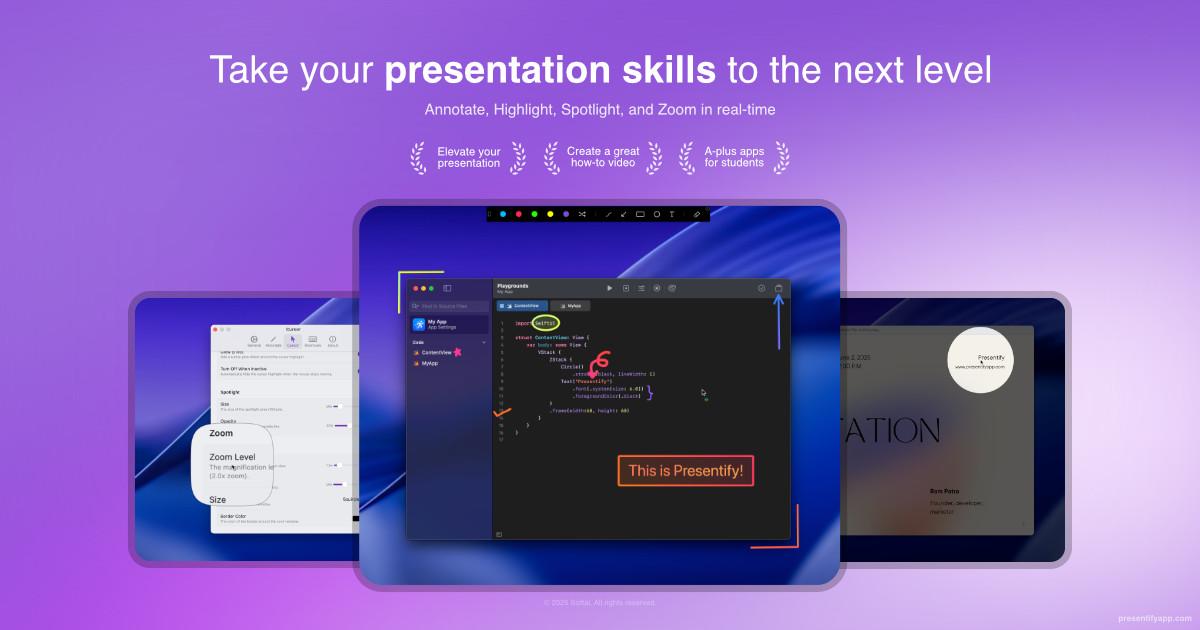
A macOS menu bar app that helps you give better presentations, online classes, or video tutorials by letting you annotate any screen, highlight your cursor, and more.
You can annotate anything on the screen, be it images, videos, pdfs, code, you name it. Presentify is quite helpful for online teaching, recording video tutorials, giving a demo, working remotely,
and the list goes on.
# FEATURES
Annotation
• You can draw on or annotate any screen you wish. Select 'Annotate Screen' from the menu bar and start doodling.
• A lot of drawing shapes to choose from. You can even write Text now.
• Draw with random gradient colours instead of just plain colours.
• Auto-erase your annotations. Perfect for emphasising something specific or explaining your thoughts. Also, toggle its behaviour by pressing the Control Key.
• You can draw even when other applications are running in full-screen mode. Great for live presentations and during video calls when working remotely.
• New Interactive Mode: This opens up Presentify in the background letting the user use other apps and allowing them to annotate by pressing and holding the Fn key.
• Now users can interact with the underlying apps when annotating (in default mode) with Presentify. Just press and hold the Fn key to do so. You no longer have to toggle Presentify to advance
your presentation slides, play/pause videos, etc.
• Highlighter feature lets you highlight portions of text without obscuring it.
• You get a Straight Line by pressing and holding the Shift Key while Freehand drawing. And, you can fill the Rectangles and Circles with a semi-transparent colour by pressing and holding the
• Works on iPad connected to a MacBook via Sidecar, Astropad, or Duet.
• Works with Keynote (even in Presentation mode).
• Compatible with all video calling software like Zoom, Google Meet, Skype, etc.
• Works with drawing tablets like XP-Pen, Wacom, etc.
Whiteboard
• Draw on a whiteboard (and not over other apps) if you wish.
• You can even change the colour of your whiteboard to whatever you feel like.
Annotate Controls
• A handy control panel to switch between different annotate tools and colours.
• Move the control panel anywhere on the screen by dragging it.
• Completely hide the control panel.
Highlight
• Cursor Highlight puts a circle, the famous squircle, or a rhombus around your mouse pointer.
• With this feature you never have to keep moving your cursor to grab the attention of your audience.
• Change your cursor highlight colour, opacity, size, and more.
• You can even choose to highlight only when you move your cursor/mouse or when you click.
Spotlight
• Spotlight puts the focus on your cursor, dimming everything else to eliminate distractions.
• You can control both the size and shape of the Spotlight, as well as the opacity of the dimmed area.
Zoom
• Zoom transforms your cursor/mouse into a magnifying glass.
• Change the shape, border, and the zoom level as per your preference.
• You can zoom the entire screen.
Keyboard Shortcuts
• You can start annotating the screen, highlighting your cursor, changing pencil colours and shapes, etc. from any app with simple keyboard shortcuts.
• Almost all actions now have keyboard shortcuts, and you can customise them however you like.
# PRESS
Featured by Apple multiple times. Also, on Hacker News, Reddit, Product Hunt, and various other blogs like ifun.de, igeeksblog.com, etc. with more than 230 upvotes in each.
# CONTACT
For any questions or concerns, visit presentifyapp.com to view the FAQ page or click the Support link.