Dropzone
Open, transfer, and install files by drag-and-drop.
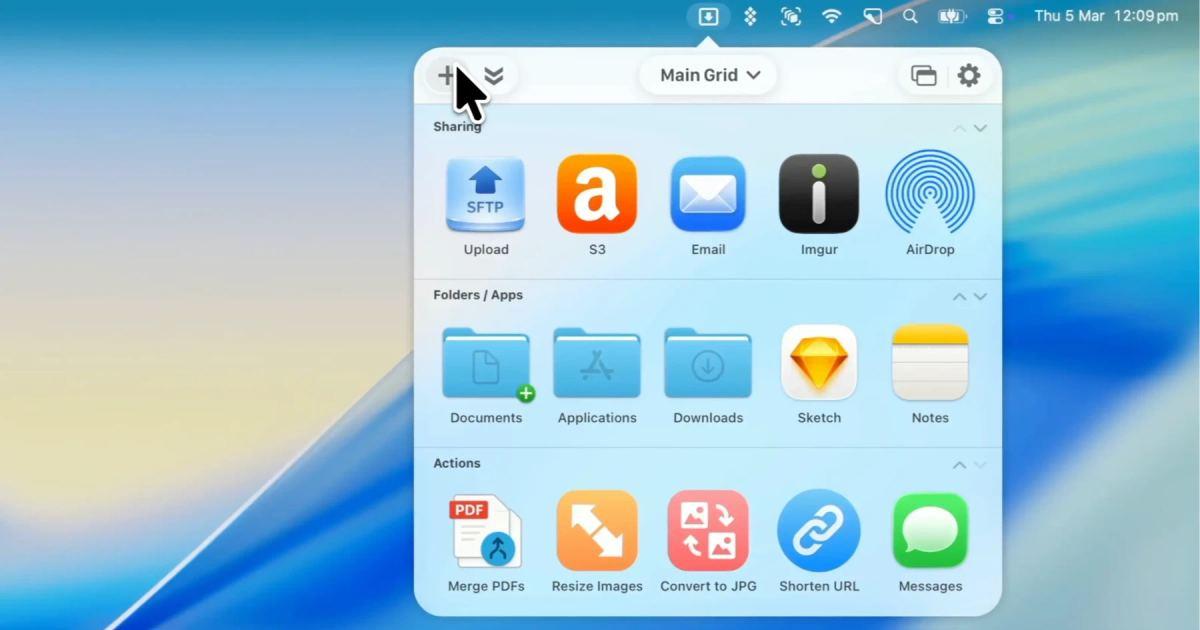
Dropzone is a Mac app that redefines your drag and drop experience, accelerates file transfers, simplifies application launches, and seamlessly integrates with many services to optimize your workflow and increase your productivity.
Completely Redesigned
Dropzone 5 has been redesigned from the ground up with a fresh, modern interface that supports Liquid Glass. Now with a cleaner grid layout, smoother animations, and an experience that feels right at home on macOS Tahoe.
Multiple Grids
Organize your actions across multiple grids and switch between them instantly. You can switch grids by clicking the drop down at the top of the grid or right-click on the menu item. Create separate grids for different workflows so you always have the actions you need.
Deeper Grid Customization
Fine-tune your grid to match how you work. Adjust the number of columns, resize the grid to your liking, and arrange actions exactly how you want them. Dropzone 5 gives you full control over your grid layout.
Custom Folder Icons
macOS Tahoe lets you assign icons and colors to folders and Dropzone 5 brings these into your grid.
Folder based actions in your grid display the custom icons and colors you've set in Finder, making it easier to identify your folders at a glance.
Deeper Terminal Integration
Dropzone 5 includes a dz command line tool that lets you control Dropzone directly from the terminal.
Run actions, add files to Drop Bar and switch between grids - all without leaving your terminal. Ideal for scripting workflows and automation.