MacappSupply

Discover

Hot Latest Trending Supply Pick

Categories

View all

More

Icons Sponsor
Submit an app
MacappSupply
AppsCategoriesIcons
SponsorSubmit an app
Apps/Productivity/Ply
Ply app icon

Ply

Productivity

Your apps forget what you were thinking. Ply keeps it.

Visit website

Author

Khalifa

Pricing

Paid

Category

Productivity

Updated

—

Clicks

63
Is this your app? Claim it to edit the listing.
Ply — image 1

About Ply

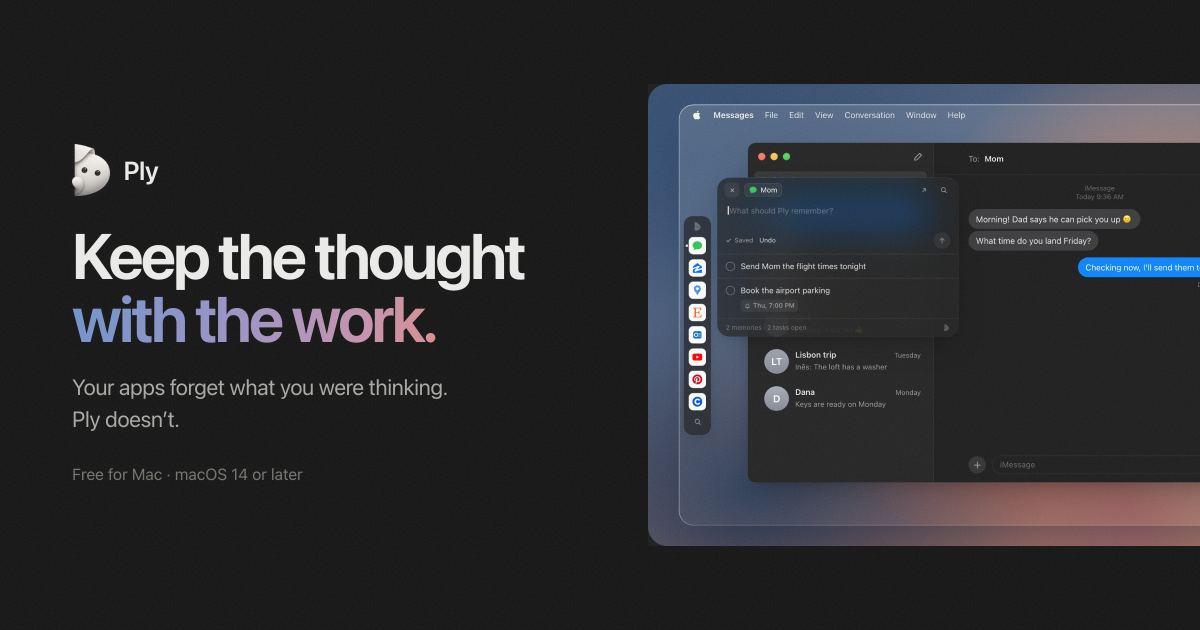
You're in the middle of something: a chat with your mom, a listing on Airbnb, a file in your code editor. A thought comes up. Send her the flight times tonight. Ask about parking. Fix that spacing later. You switch apps, and it's gone.

Ply keeps the thought with the work. It's a small companion for your Mac that remembers what you were thinking, right where you were thinking it.

How it works

Press ⌥ ⇧ Space in any app, website, or code folder and write a note, a task, or a reminder. Ply saves it to that exact place. The next time you open the same chat, page, or project, your notes are waiting for you.

There's nothing to set up and no link to paste. Ply notices where you are and keeps things together.

  • Notes for the thoughts you don't want to lose
  • Tasks you can check off when they're done
  • Reminders that show up as Mac notifications at the time you pick
  • Saved pages and files, with @ mentions to point back at them later
  • Search one project, or everything at once, with ⌘ F

Works where you already are

Messages, Gmail, Google Maps, Airbnb, Booking.com, YouTube, Figma, Cursor, Shopify, and pretty much any app or website you use. Each conversation keeps its own notes, so the notes about a friend's birthday stay in that chat. If Ply doesn't recognize an app, it still gets its own place.

Talk to it with Ply Pro

Hold ⌥ A, say it, and let go. Ply turns what you said into a note, a task, or a reminder for the place you're in. You can also ask it to:

  1. Save the page or file you're on
  2. Check something off, or undo it
  3. Answer questions from the notes you've captured

Your voice is transcribed on your Mac.

Private by design

  • Everything you capture is saved on your Mac. Nothing syncs, and nothing is tracked.
  • Ply reads window titles, page addresses, and file paths. It never reads the text on your screen or your messages.
  • Apps you merely pass through aren't recorded. A place is only saved once you write something in it.
  • Links that carry sign-in details are never saved, and tracking parameters are removed.
  • Export everything as Markdown or JSON whenever you like.

Pricing

  • Free: the whole app for up to 5 places. No account needed.
  • Own it: buy Ply once for unlimited places and every 1.x update. No subscription.
  • Ply Pro: $4.99 a month with a 7-day free trial. Includes the full app plus talking to Ply. After 2 months of Pro, Ply is yours to keep, even if you cancel.

Requirements

An Apple silicon Mac running macOS 14 or later. Ply for iOS is coming soon.

Download it free at getply.app.

More in Productivity

Woday app icon

Woday

Meet Woday, a beautifully designed daily planner for Mac.

Trailback: Find, Organize & Tidy Files on Mac app icon

Trailback: Find, Organize & Tidy Files on Mac

Search your Mac the way you remember it, then sort and tidy

Letterboxx app icon

Letterboxx

A dedicated reader for email newsletters.

Shortap app icon

Shortap

Quick tap gestures for your MacBook

Supaste app icon

Supaste

Clipboard and screenshot history

Cooldock app icon

Cooldock

Second Dock to your Mac with live widgets

ScreenPlace app icon

ScreenPlace

Effortlessly put every window in its place on your Mac.

Glance app icon

Glance

Native markdown editor for macOS

Featured apps

Woday app icon

Woday

Meet Woday, a beautifully designed daily planner for Mac.

Trailback: Find, Organize & Tidy Files on Mac app icon

Trailback: Find, Organize & Tidy Files on Mac

Search your Mac the way you remember it, then sort and tidy

Letterboxx app icon

Letterboxx

A dedicated reader for email newsletters.

Screen Movie app icon

Screen Movie

Screen Recording & Motion Editor for macOS

Shortap app icon

Shortap

Quick tap gestures for your MacBook

Supaste app icon

Supaste

Clipboard and screenshot history

Cooldock app icon

Cooldock

Second Dock to your Mac with live widgets

Subscribe for updates

Hear about new, useful, beautifully designed macOS apps as we add them to the shelf. No spam, unsubscribe anytime — by subscribing you agree to our Privacy Policy.

MacappSupply

A curated shelf of beautifully designed macOS apps.

Solt WagnerCurated bySolt Wagner

Menu

  • Home
  • Icons
  • Submit an app
  • Sponsor
  • Listing guidelines
  • Contact
  • Privacy
  • Terms

Categories

  • AI
  • Analytics
  • Audio
  • Business
  • Communication
  • Design
  • Dev
  • Entertainment
  • Finance
  • Lifestyle
  • Marketing
  • Photography
  • Productivity
  • Utility
  • Video
  • Writing

Featured

  • Woday app iconWoday
  • Trailback: Find, Organize & Tidy Files on Mac app iconTrailback: Find, Organize & Tidy Files on Mac
  • Letterboxx app iconLetterboxx
  • Screen Movie app iconScreen Movie
  • Shortap app iconShortap
  • Supaste app iconSupaste
  • Cooldock app iconCooldock

© 2026 Macapp Supply. All rights reserved.

RSS

A manually curated collection. Some outbound links may be affiliate links. Not affiliated with Apple Inc. — all app marks belong to their respective owners.