prostir zvuku
A spatial nature sound mixer for macOS
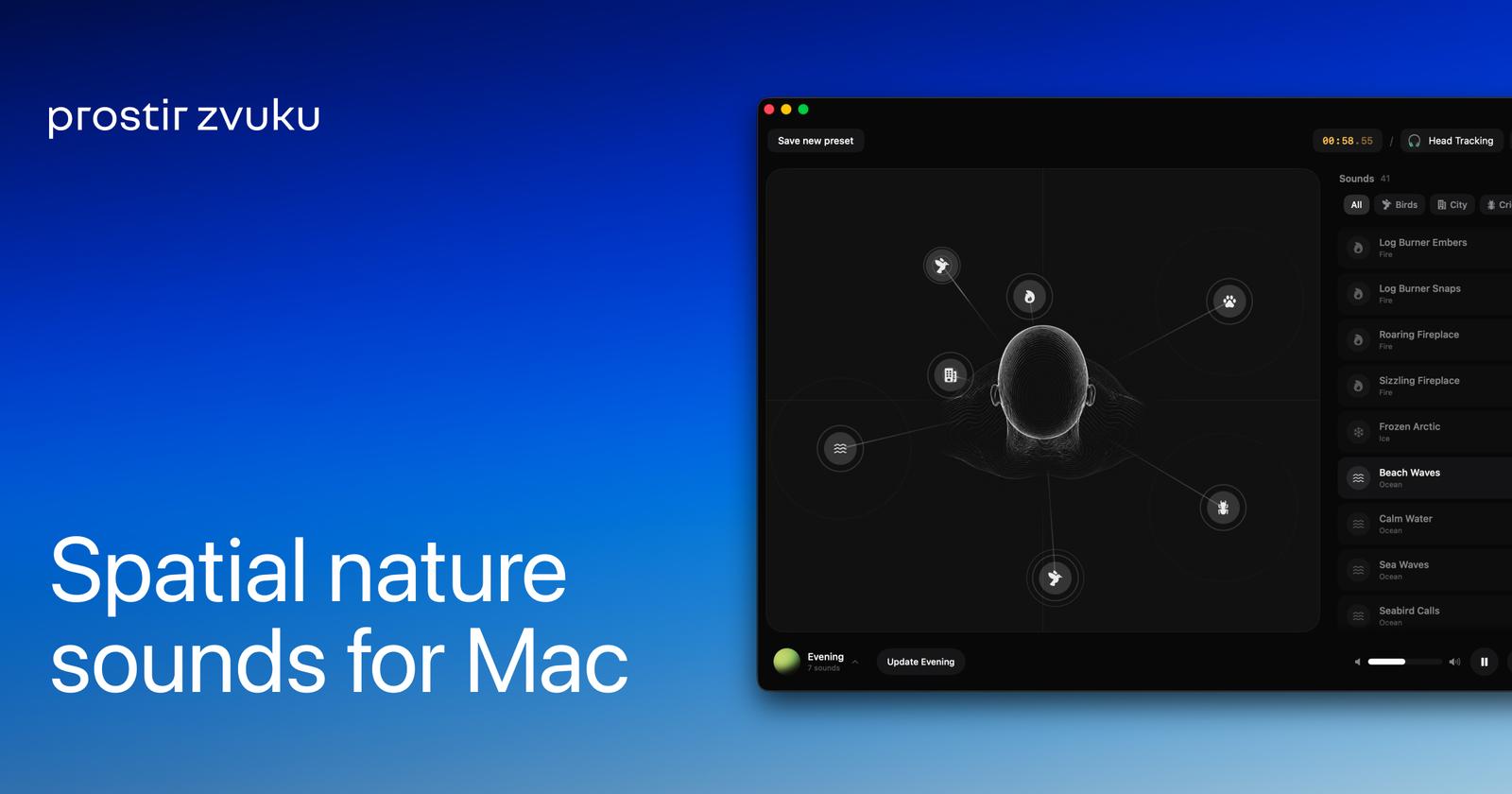
prostir zvuku is an app for building spatial nature soundscapes. Instead of playing one flat loop, it lets you place sound layers: rain, ocean, fire, wind, birds, thunder, crickets, streams, ice, farm, and city ambience – at specific points around you, like furniture in a room. The result feels less like background audio and more like a quiet place you stepped into. The name is Ukrainian for "space of sound."
Made for focus, rest, and sleep, prostir zvuku approaches background sound the way a thoughtful room is arranged: with intention. You drag a layer onto the canvas, move it until the position feels right, and the spatial audio engine places that sound exactly there in three-dimensional space. Rain wide and soft, fire close behind you, ocean far in the distance, birds just outside the edge of attention. With supported AirPods, head tracking anchors the scene to the room – turn your head, and the sounds stay where you placed them.
The app is built on Apple's native audio stack AVAudioEngine, the HRTFHQ binaural renderer, CoreMotion for head tracking, so spatial audio works through any output: Mac speakers, iPhone speakers, wired headphones, AirPods, third-party Bluetooth. AirPods are only required for head tracking, not for the spatial effect itself. The sound library ships inside the app: once downloaded, prostir zvuku runs fully offline for playback. No streaming, no account, no listening telemetry.
On Mac, prostir zvuku lives in your menu bar and, on MacBooks that have one, in the Notch Bar. On iPhone, the room stays close through the Lock Screen and Dynamic Island on supported models. A fade-out timer ends focus or sleep sessions gradually rather than with an abrupt stop. Saved rooms remember the layouts you return to, and iCloud sync keeps them moving between your Mac and iPhone.
The app is free to use, with one sound from each category, up to two simultaneous sound layers, and a five-minute timer. A single one-time purchase Lifetime Pro unlocks the full sound library, removes the layer and timer caps, unlocks saved rooms, and enables iCloud sync for rooms and the current scene. There is no subscription. Available on the App Store for macOS 14 or later and iPhone on iOS 17 or later. Built by Yevhen Holota as an indie app, made slowly and on purpose.