SpacePeek
See what’s taking space in any folder—right in Finder.
See what’s taking space—without leaving Finder
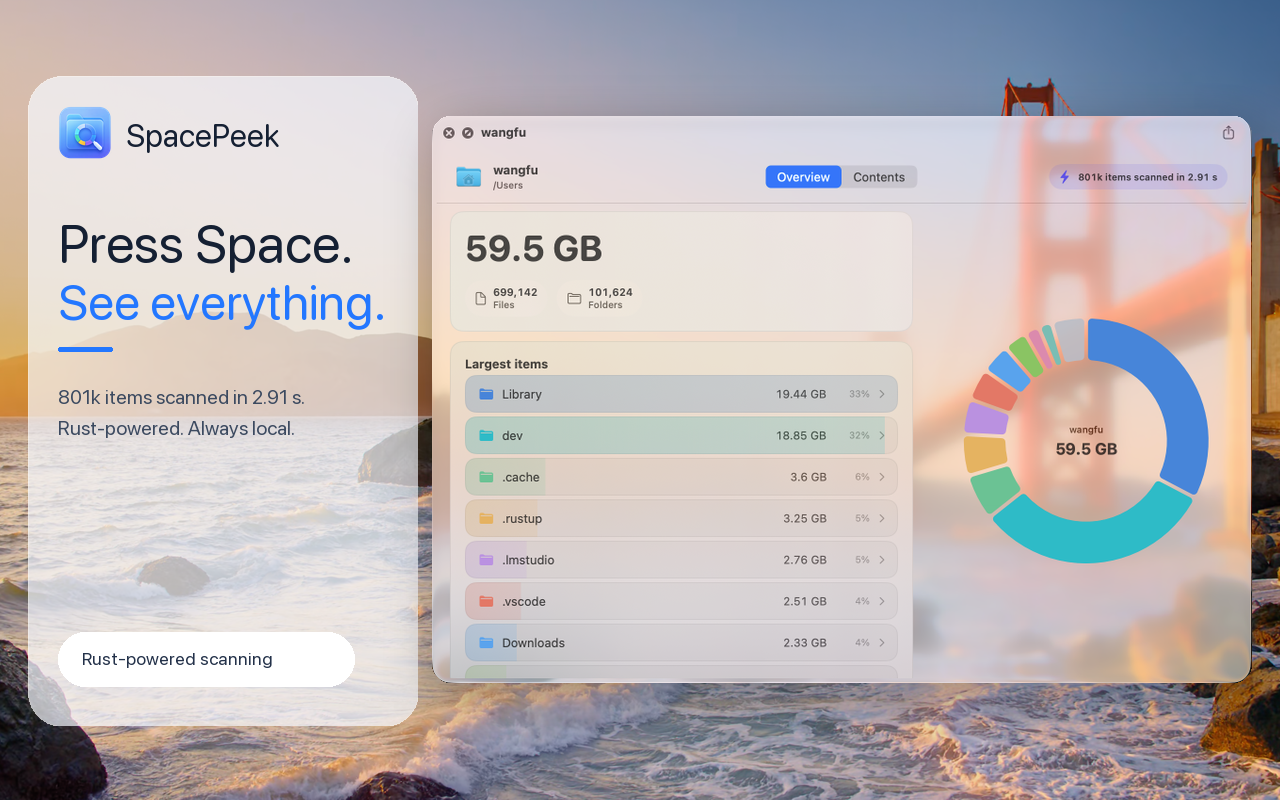
Finder’s Quick Look is useful for files, but folders remain a blind spot. SpacePeek turns the same familiar Space Bar action into a fast, visual folder inspector.
Select any folder in Finder and press Space. SpacePeek scans it on demand and shows its total size, file and folder counts, largest contents, and storage distribution. You can switch to the Contents view, browse every item, and follow large folders deeper without opening another app.
Built for real folders
- See folder size and item counts at a glance
- Find the largest files and subfolders
- Understand storage usage with a visual breakdown
- Browse and sort folder contents inside Quick Look
- Drill through nested folders without leaving the preview
- Scan large directories with a fast, Rust-powered engine
- Copy folder paths with one click
- Use it in both light and dark appearance
SpacePeek is especially useful for developers, power users, and anyone investigating a crowded Downloads folder, a large project directory, or disappearing disk space.
Private by design
SpacePeek scans only when you open Quick Look. It creates no background index, uploads nothing, and performs all folder analysis locally on your Mac.
SpacePeek is free to download and includes first-level folder inspection. SpacePeek Pro unlocks unlimited folder drill-in with a one-time $1.99 purchase—no subscription.
Requires macOS 14 or later.