Folder Hub
Show File Browser Right at Your Fingertips.
Introducing → Folder Hub
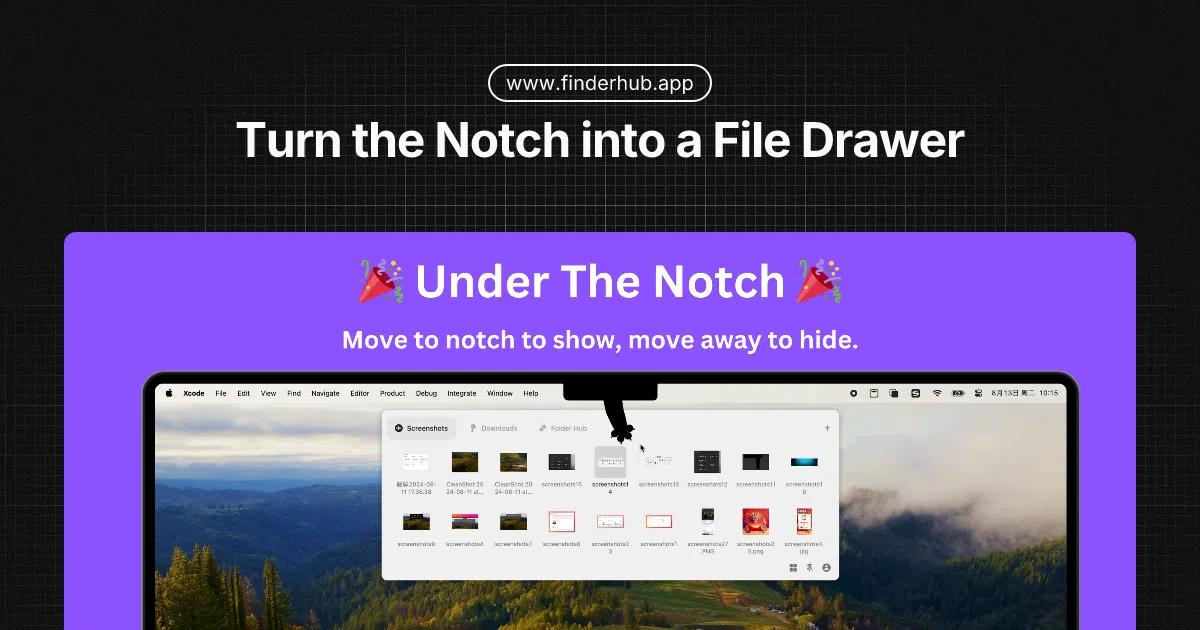
Folder Hub is an app made to fit neatly under the MacBook's notch, letting you quickly access files and folders.
Why not use Finder directly?
1. Every time I need to access files, I find myself navigating through layers of folders to locate the files below each project folder.
2. The Finder window often gets obscured by the active working window, such as the browser, making it quite challenging to drag and drop files.
With Folder Hub
You can create multiple workspaces, each representing a specific project folder. For instance, you can customize a desktop workspace for accessing files on the desktop, where the names and access location are entirely up to you. When you need to retrieve files from the desktop, simply move your mouse to the notch, and the Folder Hub Window will appear. You can open files or even drag and drop files into the browser for uploading.
Through this simple description, the following can be observed:
* Folder Hub floats above all other windows, ensuring it is not obscured by the current active window.
* No need to navigate through nested folders.
* When needing to access it again, Folder Hub remains in the last selected workspace, avoiding the inconvenience of having to find the previously closed Finder window.
One More Thing
Files and Folders Right at Your Fingertips. That is to say, you can also display the Folder Hub Window at the position of the cursor. This is a faster way to access files.
It's not an alternative to Finder, but compared to navigating through layers of folders in Finder, this method of file access is undoubtedly efficient.